

Estimated reading time: 4 minutes
Hp Laptop After the Battery Exploded inside!
This laptop owner was very lucky to have been at home when this happened. The laptop was plugged in and on charge on a table, when the owner got a burning smell. When he got closer to the laptop he saw smoke coming from underneath the laptop. He was very lucky, he unplugged the charger from the mains power and put the laptop in the garden. It then started get get worse, smoke and sparks coming from it.
A Look inside the burnt laptop
He dropped to the laptop to us in Blanchardstown, after a couple of days and after the smoke had stopped coming out of it. Thankfully, he did not want it repaired instead he was hoping to get his data of the laptop. We agreed to take it in and carefully started to take it apart.

What a Laptop Battery looks like after it has exploded
After we got the laptop apart, we saw just how badly the damage was and how lucky the owner was to have been there when this happened. This easily could have become a disastrous situation for the family involved. Once we made the laptop completely safe to work on, we did manage to get the burnt battery out of the laptop.
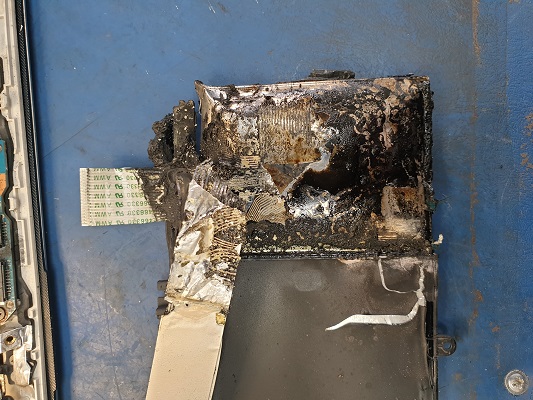
After we made it safe
Once the battery was out of the laptop and made safe. We took the harddrives out of the laptop and luckily his data was still on the both harddrives.
This owner was very lucky in many ways, but why did this happen? Was it over charging the laptop caused the battery to go on fire?
We can not say for sure why this happened, but we can make some suggestions as to why it happened. When lithium batteries get older they are more likely to expand. This happens in Laptops, smartphones, tablets and where ever you find one of these batteries, then this can happen. When the battery is not holding the charge as it should then it is time to have the battery looked at
- Replace bad batteries
- Do not use if the battery is expanding
- Do not leave on charge overnight
- Plug it out from the mains once fully charged
If you drop the device to us, we will inspect the condition of the battery. We know the signs to watch out for, and we will recommend if the battery needs to be replaced or not.
Should a device be left on charge all the time?
No, You should charge it up fully and then unplug it from the mains. This goes for Laptops, Smartphones, Tablets and all other devices. Dublin Fire Brigade posted advice on what to watch for.
If you see the back cover of the smartphone or laptop expanding, stop using it. Contact us asap.
About Celtic Repairs
We started our business back in 2013, this is our Family business. We value each and every repair as if it were our own device. This is why we always go the extra mile for you and we will always be available to answer any question or query you have. Read more Celtic Repairs on our About us Page